Simple Software Engineer Resume Template for Job Search
Create a professional Software Engineer Resume Template to highlight your skills, education, projects and work experience in a clean and simple format.
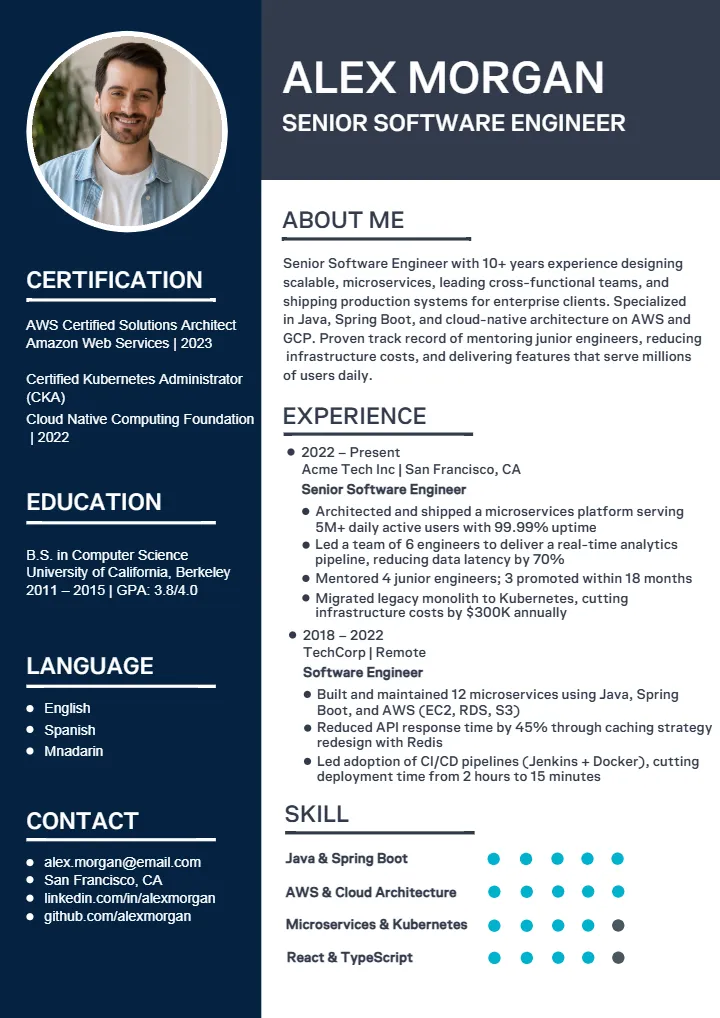

Software Engineer Resume Template to Showcase Your Tech Skills
A good software engineer resume template help you show your skills, projects, work and career goals in a clear way. A resume is not only a list of jobs. It helps recruiters fast see what you know, what you have made and how you can help a team.
You may be a fresher looking for your first software job. Or, you may be an experienced developer looking for a new job. In both cases, the right resume design can save time. It also makes your details easy to read. A clean design helps important things like programming languages, frameworks, certifications, work experience, and projects stand out.
Crafty Art has resume templates for different career needs. You can take a design that you like and add your own details. You can also change the layout to match your need. This make it easy to create a clean and professional resume without making everything from the start.
What Is a Software Engineer Resume Template?
A software engineer resume is a business document that highlights your educational background, technical skills, working experience, accomplishments and other aspects of your career. The resume template gives you the structure to organize all this information easily.
You do not have to waste time wondering where to place the sections on your resume because there already will be a pre-arranged structure that you only need to customize. A good resume for software engineers must be easy to find technical information in and still look professional at the same time.
A good software engineering resume normally includes information about programming languages, development tools, databases, frameworks, project experience, employment history and other achievements. All the information must be relevant to the job you are applying for.
Why Use a Professional Software Engineer Resume Template?
Starting from a clean slate to create a résumé may take much time. Professional templates will provide you with an initial framework and ensure consistency in your information.
A well-organized software engineer resume format can help you:
- Present technical skills in a clear way.
- Organize education and work experience properly.
- Highlight important software projects.
- Make your achievements easier to notice.
- Maintain consistent fonts, spacing and alignment.
- Save time while preparing different versions of your resume.
A resume builder for software engineer resumes would prove particularly beneficial if one needs to create his/her resume on the spot without losing the freedom to customize it to some degree. Nevertheless, the template must complement the information presented by the user rather than draw attention away from it. It is important that the design be professional and relevant qualifications be easily accessible.
Software Engineer Resume Template Sections You Should Include
The right sections depend on your experience level, but most software engineers can benefit from a clear structure. Your software engineer resume examples should ideally show how technical information and career experience can be arranged without making the page difficult to read.
Here are the main sections you can consider.
Professional Summary
The professional summary section is typically found towards the top of the resume. This help introduce the recruiter briefly about yourself and your strengths. In case of an experienced individual, the professional summary section can highlight your years of experience, area of expertise, and contributions. In case of a fresher, it can be about education and other relevant experiences.
For example, instead of writing a general statement such as “I am looking for a software engineering job,” explain what you can offer. Mention relevant technologies, development areas or project experience. A software engineer resume template can make this section visually clear, but the content should be customized for every important application.
Technical Skills Section
Technical skills are one of the most important parts of a software engineering resume. Recruiter often look for specific technology before reading the entire document.
Depending on your background, you may include:
- Programming languages
- Front-end technologies
- Back-end technologies
- Databases
- Cloud platforms
- Development frameworks
- Testing tools
- Version control systems
- Development environments
- Other relevant software tools
Avoid adding every technology you have ever tried. Focus on skill that you understand and that are relevant to the position. Your software engineer resume format should make this section easy to scan. Grouping related skills into categories can help readers understand your technical background quickly.
Work Experience and Achievements
Work experience should not only state where you worked but what you accomplished. List for each relevant position the title, organization name, dates of employment and a brief description of your responsibilities and accomplishment. Use quantifiable achievement wherever possible.
For instance, rather than stating that “you worked on a web application,” you can state how you increase its efficiency, lowered errors, assisted in releasing a new feature or made a contribution to the development process.”
For candidates preparing a senior software engineer resume, achievement become especially important. Senior positions demand the experience of demonstrating technical leadership, system design, mentoring, ownership of projects, and problem-solving abilities. The top senior software engineer resumes emphasize the importance of the impact one makes instead of daily duties.
Software Projects and Portfolio
Projects are particularly useful for freshers, career changers, freelancers, and engineers whose professional experience does not fully represent their abilities.
A project section can include:
- Project name
- Short project description
- Technologies used
- Your specific contribution
- Key features
- Results or outcomes
- Portfolio or project link, when relevant
Freshers can use academic, personal, internship or open-source projects to demonstrate practical skills. For experienced developers, only include projects that add meaningful information to the resume software engineer profile. Choose projects that show relevant technical ability or significant contributions.
Software Engineer Resume Examples for Different Career Levels
Your resume should reflect your current career stage. A fresher and a senior engineer should not use exactly the same content structure. Looking at software engineer resume examples can help you understand what information deserve more attention at each stage.
Software Engineer Resume Example for Freshers
Since the professional experience of a software engineer resume fresher profile is usually less, more importance can be given to projects, education, internships, certificate and technical skills.
A fresher resume may include:
- Career objective or professional summary
- Education
- Technical skills
- Academic or personal projects
- Internships
- Certifications
- Relevant achievements
Keep the information honest. Do not add technologies simply because they are popular. If you have built a project using a technology, explain your practical involvement. A software engineer resume template can help freshers arrange these sections in a professional way even when they have limited work experience.
Mid-Level Software Engineer Resume Example
A mid-level engineer normally has enough professional experience to focus more strongly on work history and achievements.
Your resume can highlight:
- Professional experience
- Major technical contributions
- Projects
- Problem-solving experience
- Team collaboration
- Technical skills
- Education and certifications
Use bullet points to explain meaningful contributions. If you improve a process, delivered a feature, reduced development time or help solve a technical issue, explain the outcome where possible. The goal is to show progression rather than simply listing responsibilities from previous jobs.
Senior Software Engineer Resume Example
A senior software engineer resume should demonstrate depth of experience and ownership. At this career level, recruiters may want to understand your role in architecture, technical decisions, complex projects, team support, and delivery.
A strong senior resume can highlight:
- System design experience
- Technical leadership
- Architecture decisions
- Complex project ownership
- Mentoring and collaboration
- Performance improvements
- Engineering process improvements
- Major product or platform contributions
Reviewing senior software engineer resume examples can help you understand how experienced professional present impact without making the resume unnecessarily long.
Software Engineer Resume Template Download Options
A resume should be easy to edit, save and share. The right file type can make this task simple. A software engineer resume template gives you a ready layout. You can add your name, skills, education, work, projects and other job details. Pick a file type that fits the way you want to edit and use your resume.
Software Engineer Resume PDF Format
A software engineer resume pdf is a good choice when your resume is ready to share. A PDF keeps the text, fonts, spaces, and layout in place. Your resume can look the same on many devices. You can also share it by email or other online tools. Before you save it, check your name, details, spelling, and other key information.
Software Engineer Resume Word Format
A Word file is useful when you want to make changes later. A software engineer resume template word file lets you edit your skills, work details, projects, and education. You do not need to change the whole design. The software engineer resume word format is also useful when you need an editable file for new job applications. After editing, check the page to make sure the text looks neat.
Software Engineer Resume PSD Format
A software Engineer Resume format psd is useful for people who use design software. PSD files can give you more control over text, shapes, pictures, fonts, and spaces. You can use this format when you want to make more design changes to your resume.
Software Engineer Resume CDR File Format
A software engineer resume cdr file format is useful for people who work with vector design tools. It lets you change many parts of the resume design. You can adjust the layout to suit your needs. Before sharing your resume, check the text, design and spacing one more time.
Whatever format you choose, keep your resume simple and clear. Take a file type that is easy for you to edit and use. Crafty Art helps you start with a ready design and create a clean resume for your career.
Software Engineer Resume Template Features Available on Crafty Art
Crafty Art has been created with an intention to simplify the process of creating template-based content. In selecting a resume template, one should choose templates which will allow him/her to concentrate on his/her professional information.
Useful resume template features may include:
- Clean and professional layouts
- Organized resume sections
- Editable text areas
- Flexible design elements
- Different professional styles
- Easy customization
- Download options based on template availability
- Designs suitable for different career levels
A software engineer resume builder can make the creation process more convenient by giving you a starting layout that you can personalize. Usability is the most important part of your resume. The resume should be readable and provide relevant information to the reader. It is useful to have a visually appealing resume but the content of the resume should still be the priority.
How to Customize a Software Engineer Resume Template
Making a resume can be easy when you start with a ready template. A template give you a clean space for your information. You can change the words, skills, job and project to fit your career. Follow these simple step to create a clean and professional resume.
Step 1: Add Your Personal Details
First, add your name and contact details. Write your phone number, email address, location and work profile link if you have one. Keep these detail short and clear. Check them carefully to avoid mistakes.
Step 2: Write a Simple Summary
Write a short summary at the top of your resume. Tell the employer who you are, what skill you have and what job you want. Use easy word and talk about your best skill. Keep the summary short and easy to understand.
Step 3: Add Your Technical Skills
Next, list the skill that match the job you want. You can add programming languages, software tools, databases, cloud tool and other useful skills. Keep your skill list neat. Place your most useful skills first.
Step 4: Add Your Work Experience
Add your latest work experience first. Write your job title, company name and work dates. Then, add short points about your main work and achievement. Tell what you built, fixed, improved or helped finish.
Step 5: Add Your Projects
Include those projects that demonstrate your software skills. Mention the name of the project, tools used, and your contribution to the project. For a fresher, projects could be of best help in demonstrating your skills due to lack of experience.
Step 6: Check the Resume Design
Make sure your software engineer resume format looks clean and simple. Use clear heading, easy-to-read fonts, and good space between section. Avoid using too many colors, pictures or design items. A simple design helps employers read your resume quickly.
Step 7: Save and Review Your Resume
If you use a software engineer resume template word, update every section before saving your resume. Check your spelling, phone number, email address, dates and job detail. Read your resume again to catch any small errors.
A good resume should be simple, clear and easy to read. Make each section match your skills, experience and the job you want. A clean template help you present your skills in a clear and confident way.
Create Your Professional Software Engineer Resume With Crafty Art
Creating a good resume is easy with Crafty Art. You do not have to begin with an empty page. A ready design gives you a neat place to add your name, skills, education, work, and projects. A software engineer resume builder helps you make your resume step by step. Start by adding your name and contact details. Next, write a short summary about yourself. Then, add your technical skills, work experience and key projects. Keep every part short, clear and easy to read.
Now, take a software engineer resume template that suits your career. If you are a fresher, you can select a simple design. If you have more work experience, select a layout with enough space for your skills and achievement. Add your own details and make the resume fit the job you want. Before you save the resume, check every detail. Make sure your email, phone number, dates, skills and work details are right. Look for spelling mistakes and check the design once more.
After your resume is ready, you can complete your software engineer resume download in the available format. You can share the file with employer or use it when applying for jobs. A simple resume make your skills easy to understand. With Crafty Art, you can create a clean resume that shows your skills, experience and achievements in a clear way.
Explore Top Template Categories :
Customer Reviews
See why thousands of customers love creating their perfect invitations with us.
4.7 / 5
Based on 5 customer ratings
5 star
60%
4 star
40%
3 star
0%
2 star
0%
1 star
0%
Share Your Experience
How was your invitation design?
Our Customer Feedback
Don’t take our word for it. Trust our customers
“I absolutely love using Crafty Art for all my invitation needs! Crafty Art has a wide variety of editable templates that are not only beautiful but also super easy to customize. The quality and creativity that Crafty Art offers are unmatched. It's my go-to design platform every time I need something special. Highly recommended for anyone looking to create stunning invitations with ease!”
P
Priya Mehta
“If you're looking for unique and professional-looking designs, Crafty Art is the best place to go. I recently used Crafty Art to make an invitation story and was amazed by how smooth the entire process was. The site is user-friendly, affordable, and filled with options for every occasion. Thanks to Crafty Art, I could create something memorable without hiring a designer. I’ll definitely be back for more templates!”
R
Rahul Deshmukh
“Crafty Art is one of the best platform for graphic design. They have a lot of designers, so they gave modern & new designs for every ceremony. For customization on Crafty Art’s editor was really good, it is easy to use & has a user-friendly interface. Great Experience working with Crafty Art.”
H
Heta Jariwala
“Crafty Art is the best solution for every ceremony invitation card. This platform is updated daily, they provide new designs daily for every ceremony & and all designs are easy to use. Crafty Art also offers a video invitation for any ceremony. To edit any designs, not need any type of design skills. Love the smooth editing platform, Crafty Art.”
R
Ramesh Pawar
“Crafty Art is amazing! Whether you need something simple or something really unique, they have it all. The designs are creative, the quality is top-notch, and the service is super reliable. Highly recommended!”
A
Arjun Mehra
Have more Questions?
See our help center or send us a message!

FAQs for Software Engineer Resume Template
How can I create a software engineer resume?
Can I download a software engineer resume in PDF format?
What should a senior software engineer resume include?
Is there a software engineer resume template in Word format?
What should a software engineer resume for fresher include?
Features
Create Invitation
Create Video Invitation
Wedding
Baby Shower
Birthday
Puja
Funeral
Naming Ceremony
Gender Reveal
Inauguration
Engagement
Stationery Design
Reception
Retirement
Announcement
Sport
Caricature Maker New
AI Tools New
Build Your Website New
Wedding Website Maker New
Crafty Creator New
Affiliate Program New
Bulk Whatsapp Message Sender New
 Wedding Invitation
 Engagement Invitation
 Birthday Invitation
 Baby Shower Invitation
 Naming Ceremony Invitation
 Gender Reveal Invitation
 Anniversary Invitation
 Ear Piercing Ceremony Invitation
 Half Saree Ceremony Invitation
 Thread Ceremony Invitation
 Mundan Ceremony Invitation Card
 Puja Invitation
 Kitty Party Invitation
 Reception
 Retirement Invitation
 Caricature Maker