Corporate Resume Template for Modern Office Professionals
Explore a corporate resume template with a professional layout. Edit your work experience, skills, education, and profile details for business job applications.
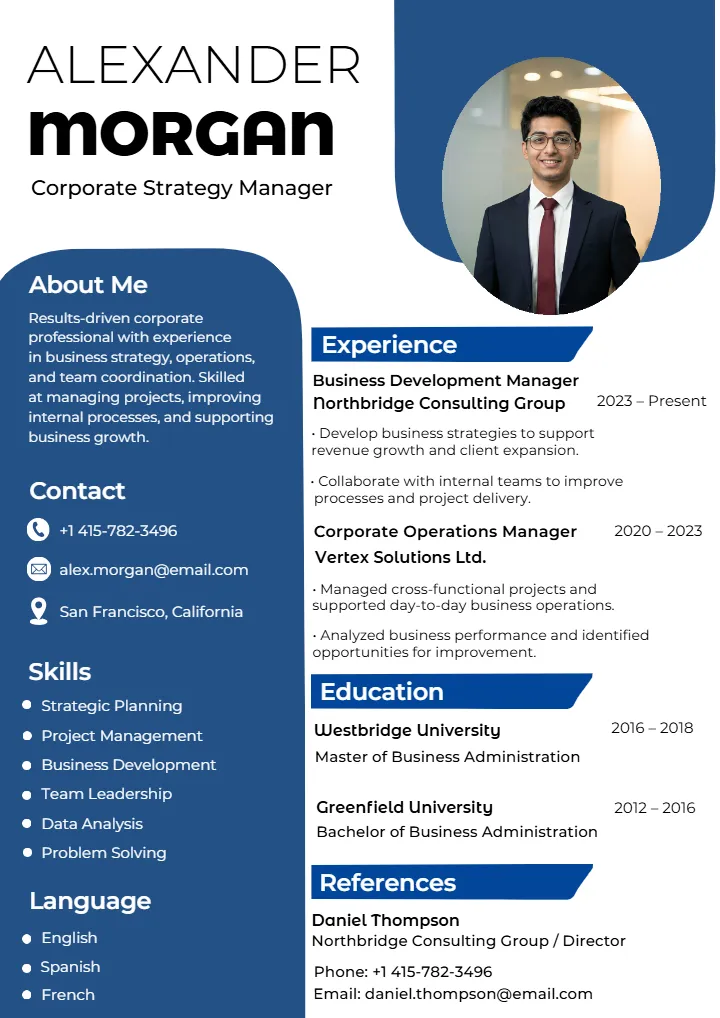
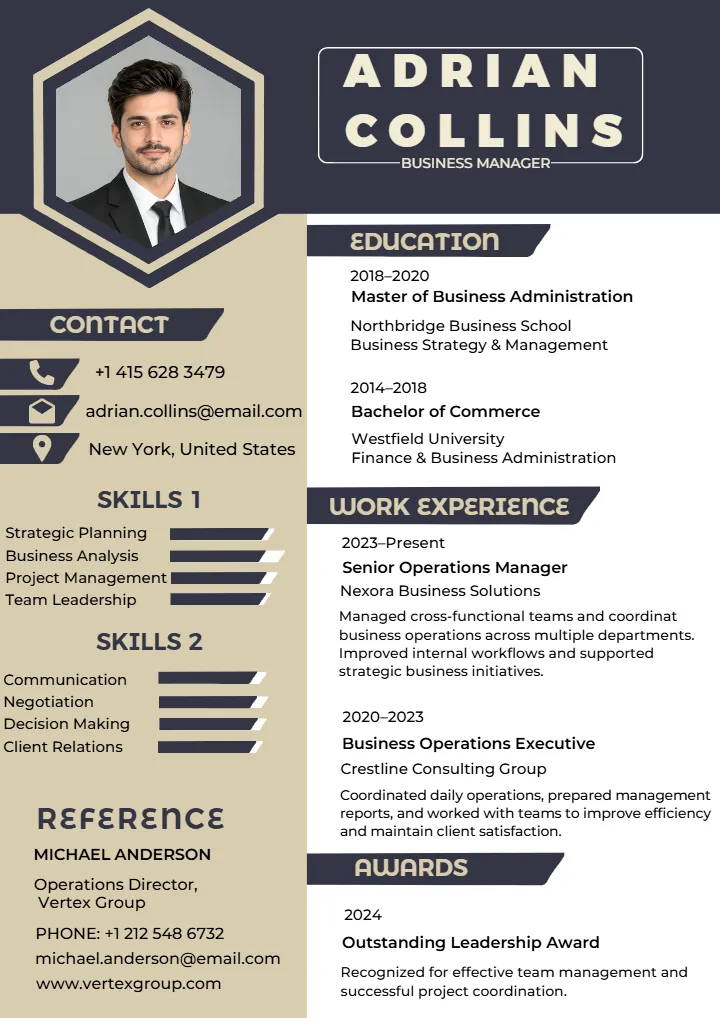
Corporate Resume Template for Choosing the Right Job Format
A professional resume is more than just an itemization of your qualifications. It is a convenient tool that will help you present your education, work experience, skills, and career objectives to a prospective employer. A good corporate resume template will help you organize all of the above in a proper manner. It will keep your resume clean and concise. This will come in handy when you apply for companies where they seek out clean resumes.
The correct resume format can make your job search easier. Freshers can use it when looking for their first job. Experienced professional can also use it when they want to find a new job. Business professional can use a clear resume template when applying for a specific job role. A good template gives you a simple structure to follow. Your education, skills, work experience and achievements then make the resume special and personal to you.
What Is a Corporate Resume Template and When to Use It?
A corporate resume template is an already designed resume for individuals seeking employment positions in firms, organizations, businesses, and professions. It features specific sections that include contact information, professional summary, work experience, education, skills, certification, and other relevant qualifications. An individual does not have to develop an entire resume at once. He or she can make use of the document template and fill personal data where sample information is indicated.
General resume can be applied to different types of occupations. A corporate resume puts more emphasis on accomplishments, experience, skills, and career development. It is usually organized properly and in a professional manner, hence making it easier for employers to locate vital information. A corporate resume will be appropriate for formal business positions since it appears professional without being overdesigned.
A corporate resume can be appropriate when you are:
- Applying for job openings within companies for sectors such as business, marketing, finance, human resources, sales, information technology, administration, or any other professional sector.
- Applying for job openings where a polished and organized approach is expected.
- Changing careers professionally and want to show relevant skills and experience.
- Applying for entry-level jobs within companies upon completing your education.
- Applying for senior or experienced level jobs where you have to showcase your career accomplishments.
Key Sections Every Corporate Resume Should Include
The resume section will vary depending on the career level and desired position; however, resumes for professionals have a common and simple format.
- Contact information: Add your name, phone number, professional email address, location and useful professional profile links. This help employer know how to contact you.
- Professional summary: In just one sentence write about your work experience, main advantage and career goals.
- Work experience: Add your relevant jobs, main duties and work achievement. Start with your latest job and then add older roles.
- Education: Highlight your degree, name of the institution, major, and other relevant academic information.
- Skills: List down all those skills which are relevant to the job and will aid you in doing the job efficiently.
- Certification: Include your professional certification, licenses, course and training. These details can show your knowledge and support your qualifications.
- Achievements: Share important accomplishments, awards, recognition, business result and other valuable contribution. Use clear details when possible.
- Projects: Add academic, freelance, personal or professional projects when they show skills that are useful for the job you want.
Explore Corporate Resume Formats for Different Career Stages
Every person does not need the same resume structure. Students looking for their first job have different details to share than professional with ten years of work experience. Selecting the right corporate resume format helps you show the most important information for your career level.
The main goal is not to add every detail about your work or education. Instead, choose your strongest and most useful information. Keep it clear and well organized. This helps an employer understand your skills and work background without looking through extra or unrelated details.
Corporate Resume Format for Freshers With No Experience
Creating a corporate resume format for freshers with no experience may feel hard at first. New graduates may not have much work history to show. But work experience is not the only way to show your skills. Education, internships, college projects, certificate, volunteer work and useful skills can all show that you are ready for a job.
Freshers should focus on their skills, knowledge and practical learning. They do not need to copy the resume of an experienced worker. A clear career objective can tell employers what type of job you want. Projects and internship can also show how you used what you learned outside the classroom.
Education can be an important part of a fresher resume, especially when your degree match the job. Academic projects can also show skill such as research, communication, technical work, problem-solving, analysis and teamwork. Relevant certification and volunteer activities can be added when they give useful information about your skills and support your job application.
Corporate Resume Format for Experienced Professionals
An experienced corporate resume should make your work story easy to understand. You do not need to give the same space to every job. Focus on the job, duties and achievement that match the job you want.
Start with a short professional summary. It should tell the employer about your main work area, skills and years of experience. Then, add your work history in a clear order. Show how your duties and skills grew with each job. When possible talk about the results of your work instead of only listing your duties. For example, you can mention how you made a work process better, led a team, increased sales, save money or complete an important project.
Leadership skill are also useful when you apply for a manager or senior position. You can include experience in team management, helping other workers, managing projects, talking with clients or teams, planning work and making important decisions. Your technical and professional skills should support your work experience. Try not to repeat the same information in both sections.
Resume Format for Company Job Applications
A resume for corporate job applications should match the job you want. You should not use the same resume for every job. Different companies may need different skills, even for similar job. Read the job description carefully. It can help you know which skills and experience to show first.
When making a resume format for company job applications, check your experience against the needs of the company. You can change your summary, skills, work details, and project details when needed. Never add skills that you do not have. Show the real skills and experience that match the job. This keeps your resume clear, honest and useful for the employer.
Corporate Resume Design and Style for Professional Applications
Good corporate resume design should make your work details easy to read. It should not take attention away from your information. A clear corporate resume style can use a simple layout, easy-to-read fonts, equal spacing, clear heading and small design details. The resume should look clear on a computer or phone screen. It should also look neat when printed.
The professional resume doesn’t require any complicated format. The majority of corporate positions will require a resume which is neat and legible. Adequate margins, appropriate fonts and clear formatting can help highlight all necessary information.
Corporate Resume Examples for Different Job Roles
Corporate resume examples can help you know what details to add for a job. The main resume structure can stay the same. However, the information should change based on the skills and duties of each job.
- Business professional: Show skills in business work, planning, client relations, process improvement, and business results.
- Marketing professional: Show work in campaigns, digital marketing, content, market research, analytics, and campaign results.
- HR professional: Include skills in hiring, employee relation, HR work, training, company policies and people management.
- Finance professional: Add experience in financial analysis, reports, accounting, budgeting, compliance and financial software.
- Sales professional: Show sales goals, revenue, customer growth, account management, conversions and customer relationships.
- IT professional: Focus on technical skills, programming languages, software, systems, certification and useful project.
- Administrative professional: Highlight organization, scheduling, document, communication, office work and administrative tool.
These examples are only guides. They are not fixed rules for every resume. Your resume should show your real experience and connect it with the skills and need of the job you want.
Corporate Resume Template Word and Editable Format Options
An editable corporate resume template word file is a useful choice for job seekers who want to make and update their resume in a familiar word processing program. Word templates are helpful when you mainly need to edit text and do not need complex design changes.
With an editable format, you can keep one main resume and make different versions for each job. You can add new work experience, include new qualifications, and change the skills section to fit different job roles. Before you send the final resume, check the document carefully. Make sure all text, spacing, and page layout still look correct after editing.
Corporate Resume Template in Word Format
Using a Word resume is a useful choice when you need to update your details often. You can change your personal details, add new work experience, update your skill and edit other sections as your career grows. You can also make different resume version for different job while keeping the same design. After making changes save the file for later use or print it when you need a paper copy.
Corporate Resume Template PDF Format
A corporate resume template PDF is useful when your resume is ready to share. PDF keep your text, spacing, alignment and page design the same on different device. You can send your resume by email, upload it to a job application platform or print it on paper. Before you share the file check your contact detail and make sure all the information is correct.
Printable Corporate Resume Templates for Job Applications
Printable corporate resume templates should be checked before you print them. Check the page margins, font size, spacing, alignment and print quality. These thing can change how the resume look on paper. Make sure no important information is cut off and that the text is easy to read. A clean and simple page layout can make your printed resume look clean and well organized.
Corporate Resume PSD Format for Detailed Customization
A corporate resume PSD format can be helpful for people who want more control over their resume design. PSD files can allow detailed editing in supported design software. This depends on how the original template was made. People who know design tools can change the font style, text position, spacing, layout parts, and other editable elements to make a professional resume that fits their needs.
Corporate Resume CDR File Format Download Options
A corporate resume CDR file format download can be useful for people who want to edit a resume in vector-based design software. Before downloading a CDR file, check if the needed fonts are included and which software is required. Also, check which parts of the file can be edited. Make sure the page size and file type work well for both digital sharing and printing.
How to Choose a Corporate Resume Template for Your Job
Choosing the right corporate resume template start with knowing the job you want. The template should give you enough space to show the skills and qualifications needed for that job. It should also keep your resume easy to read. Think about your career level, industry, job needs, editing software and final file format. A simple Word layout can work well for a regular business job. A designer may need a format with more control over the design.
Before selecting a template, check a few simple things. Make sure the design is easy to read. Check if you can change the section. Make sure it has enough space for all your information. Also, check if you can save the final resume in the file format ask for by the employer.
Choose Based on Experience and Job Requirement
Your work experience can help you decide which parts of your resume need more space.
- Fresher: Focus on education, internships, academic projects, certifications, skill and useful activities.
- Mid-level professional: Focus more on work experience, job achievements, duties and special skills.
- Senior professional: Show leadership experience, important duties, career results, major projects and team management.
- Business professional: Choose a clear layout that shows your work experience, business skills, achievement and qualifications.
The template should help you show your career story. It should not make you fit your information into a layout that does not work for you.
Choose the Right File Format for Your Needs
The right file format depend on how you want to edit, share or print your resume.
- Word: Easy to edit, update and change for different job application.
- PDF: Good for sharing and printing because it keeps the final layout in place.
- PSD: Good for detailed design changes with compatible software.
- CDR: Useful for vector-based editing and graphic changes with compatible software.
For most company applications, use the file format given by the employer. If the employer does not give a format, keep both files. Save an editable source file and a final PDF. This can make future updates and sharing easier.
Corporate Resume Builder Format for Quick Resume Creation
A free corporate resume builder format can make resume creation easier. It give you a ready structure to follow. You do not need to start with an empty page. You can add your detail to clear section and change the layout based on your career level and target job.
The resume can be made in a few easy steps:
- Select a suitable corporate resume template: Take a clean and professional design that fit your experience and target job.
- Add personal information: Enter your name, phone number, email address, location and useful professional profile links.
- Enter education and experience: Add your education, internships, work history, job duties and achievement.
- Add relevant skills: Add skill that match the job and that you can show through your past work or experience.
- Customize the layout: Change the section, spacing, font style and other design option that are available.
- Download the finished resume: Keep an editable copy and save the final resume in the file format asked for by the employer.
A resume builder can help you finish the formatting faster. However, the content still needs your care. Do not use only common or general statements. Add clear details about your qualifications, duties, projects and achievements. This helps show what you can offer in a professional job.
Start Your Corporate Resume Template With a Professional Design
Your resume should show your professional background in a clear and simple way. This will help make the information clear and well-structured based on the job one is targeting. Whether someone needs a corporate resume for freshers or an experienced professional resume or even applying to a new job opportunity, a structure will definitely make the process easy.
Select a professional corporate resume design that fits your career level and industry. Then, change the content to match your own experience. Do not depend only on sample text. Keep your details correct. Use short descriptions. Show your useful achievements. Check the full resume before you submit it.
A good corporate resume template gives your resume a clear structure. Your own qualification make it useful and valuable. Use a clear format an easy to read design, relevant content and the right file format. This can help you create a resume that clearly show your professional profile and is ready for your next job application.
Looking for more useful document designs? Explore our collection of biodata templates, certificate templates and letterhead templates for personal, professional, and official needs. Choose a suitable template, add your details, and create a clean document with ease.
Explore Top Template Categories :
Customer Reviews
See why thousands of customers love creating their perfect invitations with us.
4.7 / 5
Based on 5 customer ratings
5 star
60%
4 star
40%
3 star
0%
2 star
0%
1 star
0%
Share Your Experience
How was your invitation design?
Our Customer Feedback
Don’t take our word for it. Trust our customers
“I absolutely love using Crafty Art for all my invitation needs! Crafty Art has a wide variety of editable templates that are not only beautiful but also super easy to customize. The quality and creativity that Crafty Art offers are unmatched. It's my go-to design platform every time I need something special. Highly recommended for anyone looking to create stunning invitations with ease!”
P
Priya Mehta
“If you're looking for unique and professional-looking designs, Crafty Art is the best place to go. I recently used Crafty Art to make an invitation story and was amazed by how smooth the entire process was. The site is user-friendly, affordable, and filled with options for every occasion. Thanks to Crafty Art, I could create something memorable without hiring a designer. I’ll definitely be back for more templates!”
R
Rahul Deshmukh
“Crafty Art is one of the best platform for graphic design. They have a lot of designers, so they gave modern & new designs for every ceremony. For customization on Crafty Art’s editor was really good, it is easy to use & has a user-friendly interface. Great Experience working with Crafty Art.”
H
Heta Jariwala
“Crafty Art is the best solution for every ceremony invitation card. This platform is updated daily, they provide new designs daily for every ceremony & and all designs are easy to use. Crafty Art also offers a video invitation for any ceremony. To edit any designs, not need any type of design skills. Love the smooth editing platform, Crafty Art.”
R
Ramesh Pawar
“Crafty Art is amazing! Whether you need something simple or something really unique, they have it all. The designs are creative, the quality is top-notch, and the service is super reliable. Highly recommended!”
A
Arjun Mehra
Have more Questions?
See our help center or send us a message!

FAQs for Corporate Resume Template
What is the best corporate resume format?
What should I include in a resume for a corporate job?
Are corporate resume templates printable?
Can I use PSD or CDR for a corporate resume?
How should freshers create a corporate resume?
Features
Create Invitation
Create Video Invitation
Wedding
Baby Shower
Birthday
Puja
Funeral
Naming Ceremony
Gender Reveal
Inauguration
Engagement
Stationery Design
Reception
Retirement
Announcement
Sport
Caricature Maker New
AI Tools New
Build Your Website New
Wedding Website Maker New
Crafty Creator New
Affiliate Program New
Bulk Whatsapp Message Sender New
 Wedding Invitation
 Engagement Invitation
 Birthday Invitation
 Baby Shower Invitation
 Naming Ceremony Invitation
 Gender Reveal Invitation
 Anniversary Invitation
 Ear Piercing Ceremony Invitation
 Half Saree Ceremony Invitation
 Thread Ceremony Invitation
 Mundan Ceremony Invitation Card
 Puja Invitation
 Kitty Party Invitation
 Reception
 Retirement Invitation
 Caricature Maker